Your own subscription
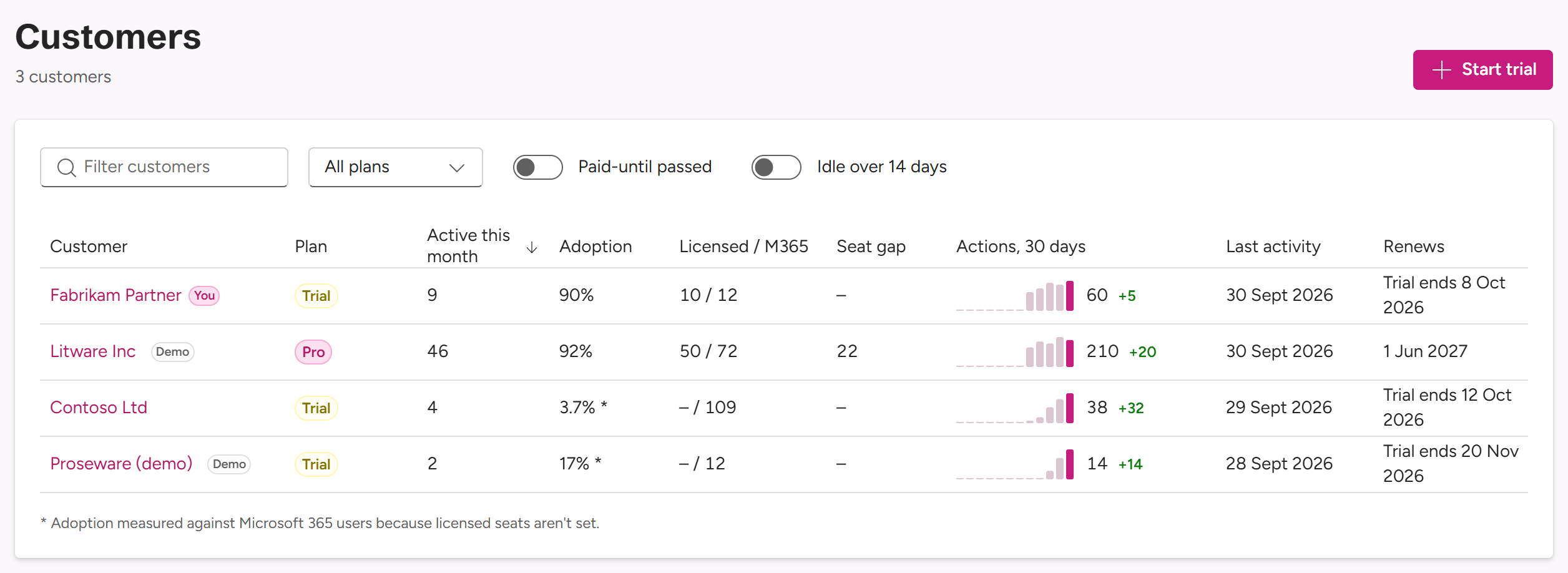
If your company uses MailConnect itself, its subscription is your first customer.
Where it sits
- At the top of Customers, marked You, whatever the sort.
- First in search, marked You.
- In the path, under your own pages: Fabrikam Partner / Fabrikam Partner.
It has the same tabs as any customer: Usage, People, Overview and Settings.
Who manages it
Your people get there what they get on your customers. Owners and Managers manage it: its Admins and Viewers, its settings and its tabs, including Preview features under your Early access and features above its plan under Beyond plan. Viewers see it. All customers covers it, and it can be picked for an employee with selected customers.
It can also have Admins and Viewers of its own, like any customer: people at your company who aren’t on your partner team, for example your IT department. They get what a customer’s admins get. Unlike your customers’ admins, they see your employees by name, since they’re colleagues.
Partner team only
On your own subscription, the 🤝 strips read Partner team only: your partner team and Pinksky see what’s in them, its own Admins and Viewers don’t. On its People tab, the changes to your employees in Recent changes are for your Owners only.
Left out of your totals
Your own use doesn’t count towards your customers’ figures. Your own subscription is left out of the totals on Home and Usage, and in Needs attention only its trial ending shows. It’s never a demo, so it has no Demo tenant switch.