Customers and trials
Starting a trial
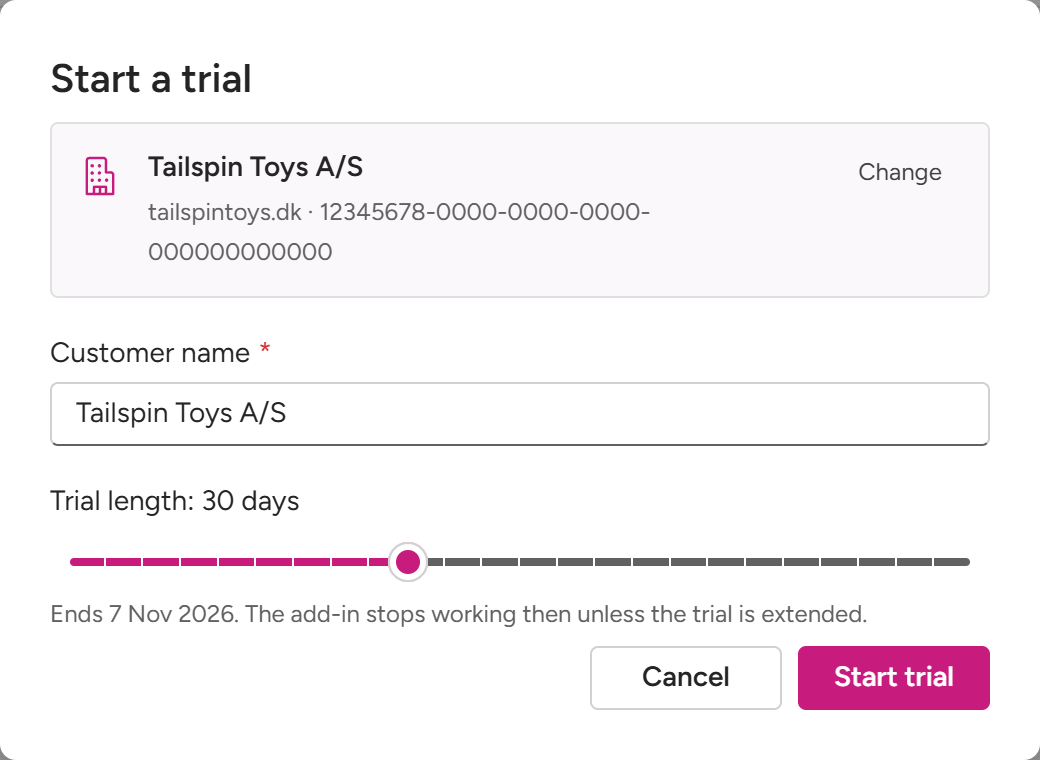
Your Owners, and employees who manage all your customers, can start trials. On Customers, select Start trial (or New → Start trial in the top bar):
- Enter the customer’s Microsoft 365 tenant ID, or one of its domains (
contoso.com), and select Lookup 🔎. The Admin Center finds the tenant and its name. - Customer name: filled in with the name Microsoft gives; change it if you want.
- Trial length: 21 days, or longer, up to your limit.
- Select Start trial.
The new customer is linked to Fabrikam, and you land on its pages. Its trial is enforced: MailConnect stops working at the end date unless the trial is extended or converted. A tenant that already has a MailConnect subscription can’t get a trial.
How long a trial can run
At least 21 days. Pinksky sets your longest trial: 21 days unless agreed otherwise. With a longer limit, a slider picks the length, and the dialog shows the end date. Ask Pinksky if you need longer trials.
Trials customers start themselves
A customer can also start a 21-day trial from Outlook, the first time someone there opens MailConnect. That trial has no partner: ask Pinksky to link the customer to Fabrikam.
Extending and converting
Extending a trial, turning it into a paid subscription, and changing a customer’s plan or seats all go through Pinksky. A customer’s Overview tab says so: To extend a trial or change the plan, contact Pinksky. A trial shows in Needs attention from two weeks before it ends, and once it has ended.
When a trial ends, nothing is deleted: the customer’s archived emails, setup and history are kept. See Your trial, which you can share with customers.
Cancelling a subscription
If a paying customer’s subscription shows a Renews date, your Owners and Managers can cancel it on its Overview tab with Cancel subscription…, as the customer’s own Admins can. It keeps working to the end of the period already paid for, and can be taken back until then. A cancelled subscription shows in Needs attention until it ends.
Demo customers
A customer you use for demos can be marked as one: on its Overview tab, switch on Demo tenant in the 🤝 strip under Details. Only your Owners can switch it, and everyone at Fabrikam sees it. The customer doesn’t.
A demo customer keeps its pages, and a Demo pill wherever it’s listed. It’s left out of your totals, the headline numbers and Needs attention, apart from a trial that’s ending. On Usage, Include demo tenants brings demo customers back in. Your own subscription can’t be a demo.